Compliance
SMS Consent Practices
Last updated: July 14, 2026
Overview
LobbyFree is an AI-powered booking and lead management platform for service-based businesses. We send transactional SMS messages to end consumers who have explicitly opted in during the appointment scheduling process. We do not send marketing or promotional messages. All SMS is sent from a single platform-owned toll-free number on behalf of our business clients.
Consent is collected through four channels: our online booking page, our AI-powered web chat, our AI-powered voice agent, and manual bookings created by business owners on behalf of their clients. Each channel collects explicit, informed consent before any SMS messages are sent. The sections below describe the exact consent workflow for each channel.
1. Online Booking Page
How consent is collected
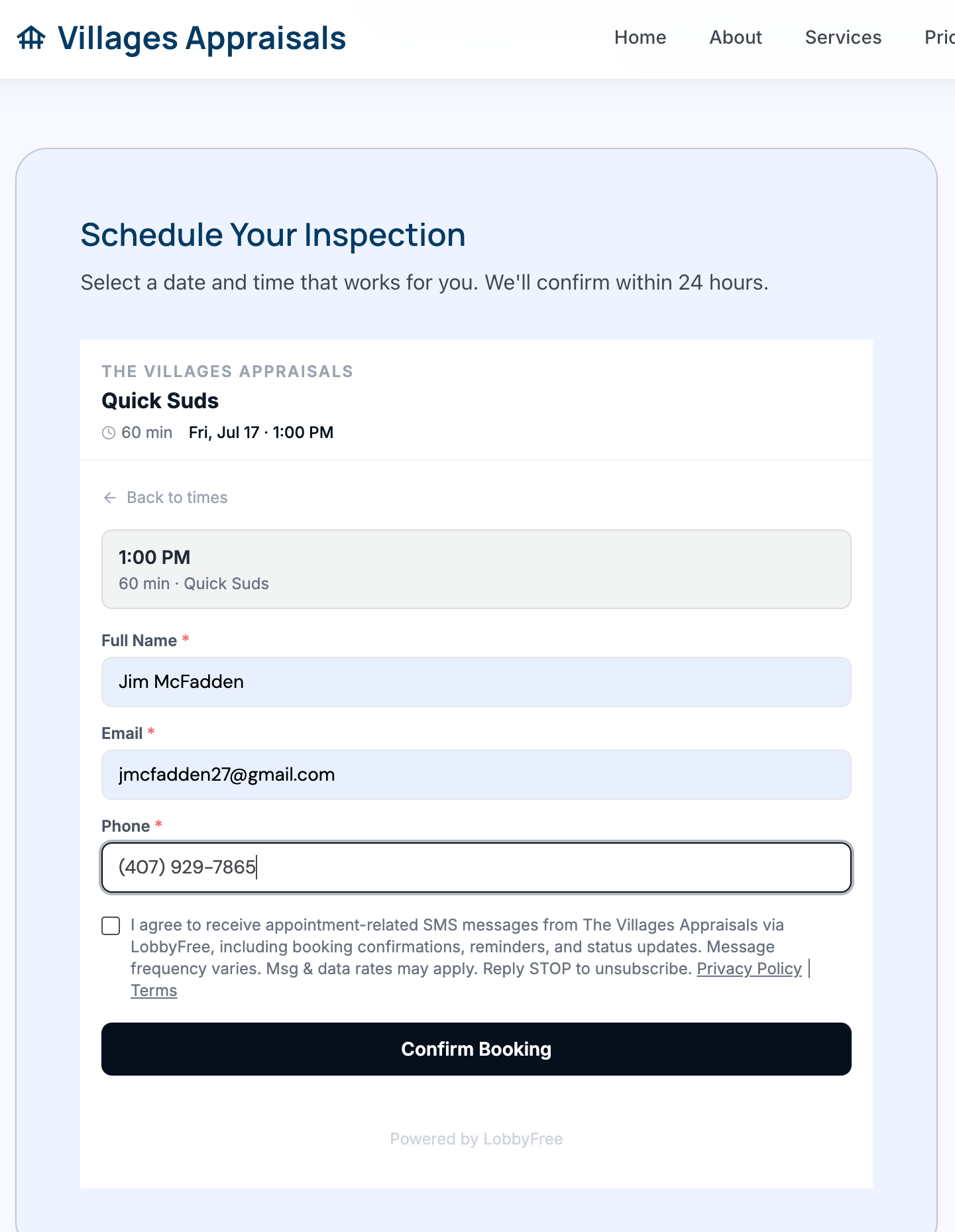
When an end consumer books an appointment through a business's public LobbyFree booking page, an opt-in checkbox is displayed on the booking form below the phone number field. The checkbox is unchecked by default — the consumer must actively check it to opt in. Consent is never pre-selected.
Exact consent language
I agree to receive appointment-related SMS messages from [Business Name] via LobbyFree, including booking confirmations, reminders, and status updates. Message frequency varies. Msg & data rates may apply. Reply STOP to unsubscribe. Privacy Policy | Terms
When in the flow
The checkbox appears on the booking details form, below the phone number field and any intake or qualification questions, directly above the submit button. The booking can be completed without opting in — SMS consent is not required to schedule an appointment.
How to verify
- Visit any business's public booking page at lobbyfree.com/book/[business-slug]. Each business on the platform has a unique booking URL.
- If the business offers multiple appointment types, select one. If only one type is configured, it is selected automatically.
- A monthly calendar displays available dates. Select a date with availability (indicated by a dot beneath the date).
- A list of available time slots appears for the selected date. Select a time slot.
- The booking details form appears with fields for Full Name, Email, Phone, and any business-configured intake questions.
- Below the phone number field and intake questions, the SMS opt-in checkbox is displayed — unchecked by default. The consumer must actively check it to opt in.
Screenshot
2. AI Web Chat
How consent is collected
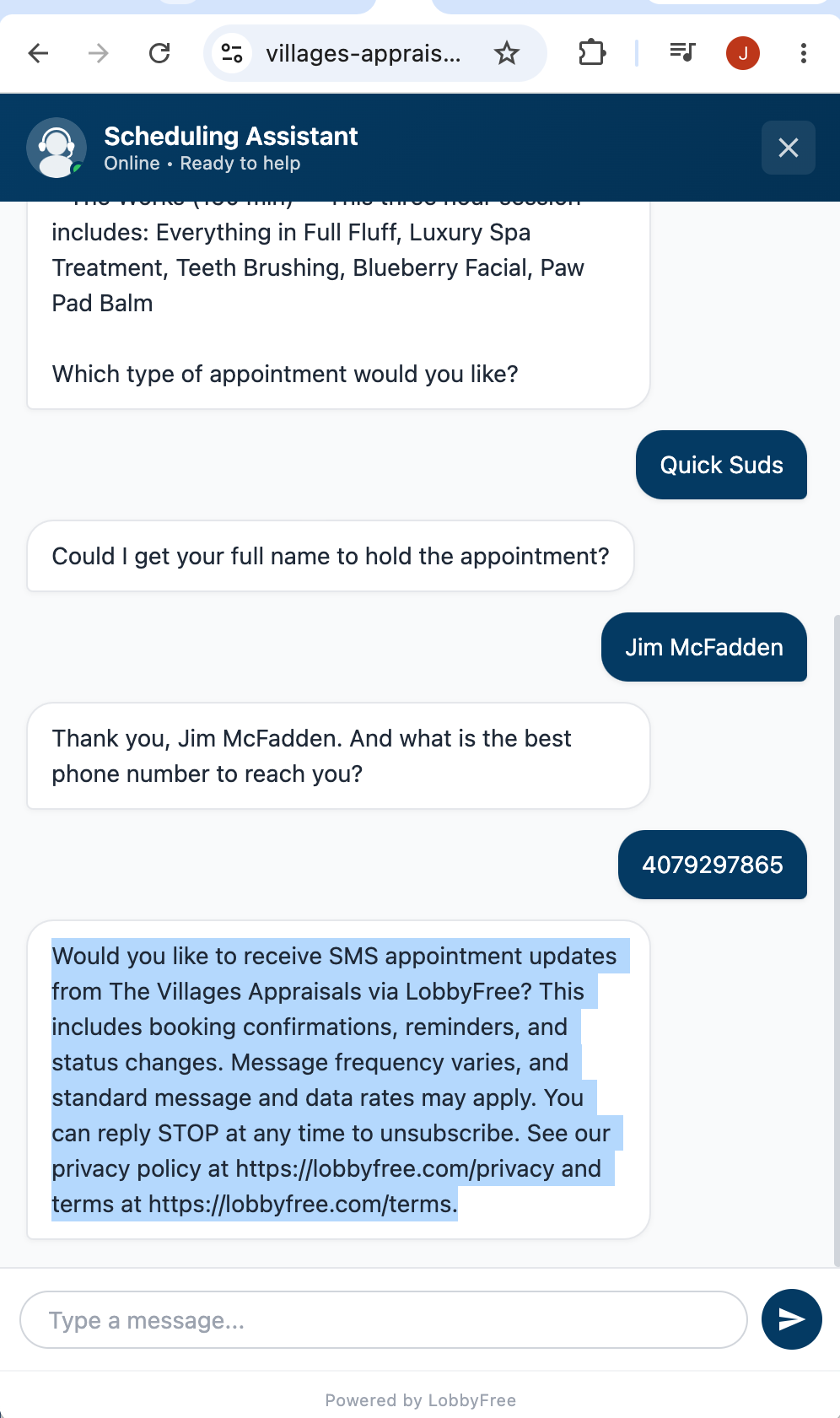
During a chat-based scheduling conversation, after the consumer provides their phone number, the AI assistant asks whether they would like to receive SMS appointment updates. The consumer responds by typing "yes" or "no." If the response is ambiguous, consent defaults to no.
Exact consent language
Would you like to receive SMS appointment updates from [Business Name] via LobbyFree? This includes booking confirmations, reminders, and status changes. Message frequency varies, and standard message and data rates may apply. You can reply STOP at any time to unsubscribe. See our privacy policy at lobbyfree.com/privacy and terms at lobbyfree.com/terms.
When in the flow
The SMS consent question is asked after the consumer's phone number has been collected and before email and remaining intake fields. The consumer can decline and still complete the scheduling process.
Screenshot
3. AI Voice Agent
How consent is collected
During an AI-handled phone call, after the caller's phone number has been collected and confirmed, the voice agent verbally asks whether they would like to receive text message appointment updates. The caller responds by saying "yes" or "no." If the response is ambiguous, consent defaults to no.
Exact consent language
Would you like to receive text message appointment updates from [Business Name] via LobbyFree? This would include booking confirmations, reminders, and any status changes. Message frequency varies. Standard message and data rates may apply, and you can opt out at any time by replying STOP.
When in the flow
The SMS consent question is asked after the caller's phone number has been confirmed and before any remaining intake fields such as email or address. The caller can decline and still complete the scheduling process.
4. Manual Booking by Business Owner
How consent is collected
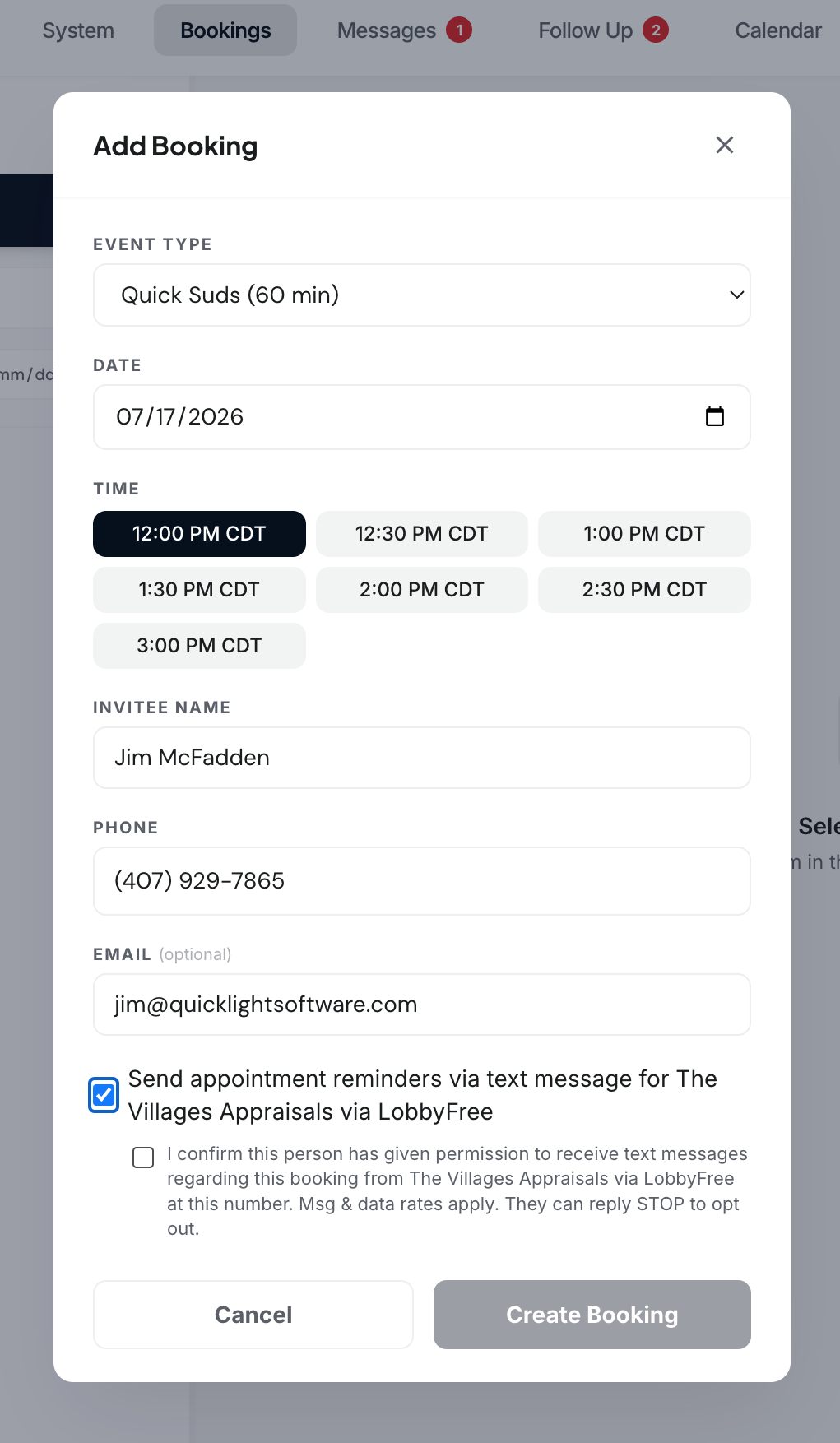
When a business owner creates a booking on behalf of a client through the LobbyFree dashboard, a checkbox labeled "Send appointment reminders via text message for [Business Name] via LobbyFree" is available to enable SMS appointment reminders for that client. The checkbox is unchecked by default. When the business owner checks the box, a second attestation checkbox appears. The business owner must check the attestation checkbox to confirm they have obtained permission from the client to send text messages. The booking cannot be submitted with SMS enabled unless the attestation checkbox is checked.
Attestation language
I confirm this person has given permission to receive text messages regarding this booking from [Business Name] via LobbyFree at this number. Msg & data rates apply. They can reply STOP to opt out.
When in the flow
The checkbox and attestation notice appear on the booking creation form, below the invitee contact fields. The booking can be created without enabling SMS — reminders are not sent unless the business owner explicitly opts in and attests to having permission.
Screenshot
Record keeping
The platform records which user enabled SMS reminders for each booking. The consent attestation, the identity of the user who made it, and the timestamp are stored on the booking record for compliance audit purposes.
5. Message Types
All SMS messages sent through LobbyFree are strictly transactional. We do not send marketing, promotional, or advertising messages. Message types include:
- Booking confirmations
- Appointment reminders
- Booking status updates (confirmed, declined, rescheduled, cancelled)
6. Opting Out
Consumers can opt out of SMS messages at any time by replying STOP to any message. Upon opting out, they receive a confirmation and no further messages are sent unless they opt in again. Consumers can also reply HELP for assistance or contact support@quicklightsoftware.com.
7. Data Handling
Phone numbers and SMS consent preferences are stored securely and are never shared with third parties for marketing purposes. Consent status is tracked per consumer and per business. For full details on how we handle personal data, see our Privacy Policy. For SMS-specific terms, see Section 9 of our Terms of Service.
8. Contact
For questions about our SMS messaging practices, contact us at:
Quicklight Software LLC
support@quicklightsoftware.com